
For contractors
3 minRun and export the compliance report
Use the compliance report to review your current roster, filter by status or expiry, and export the results.
Anyone on the team
- 1
1.Open the report
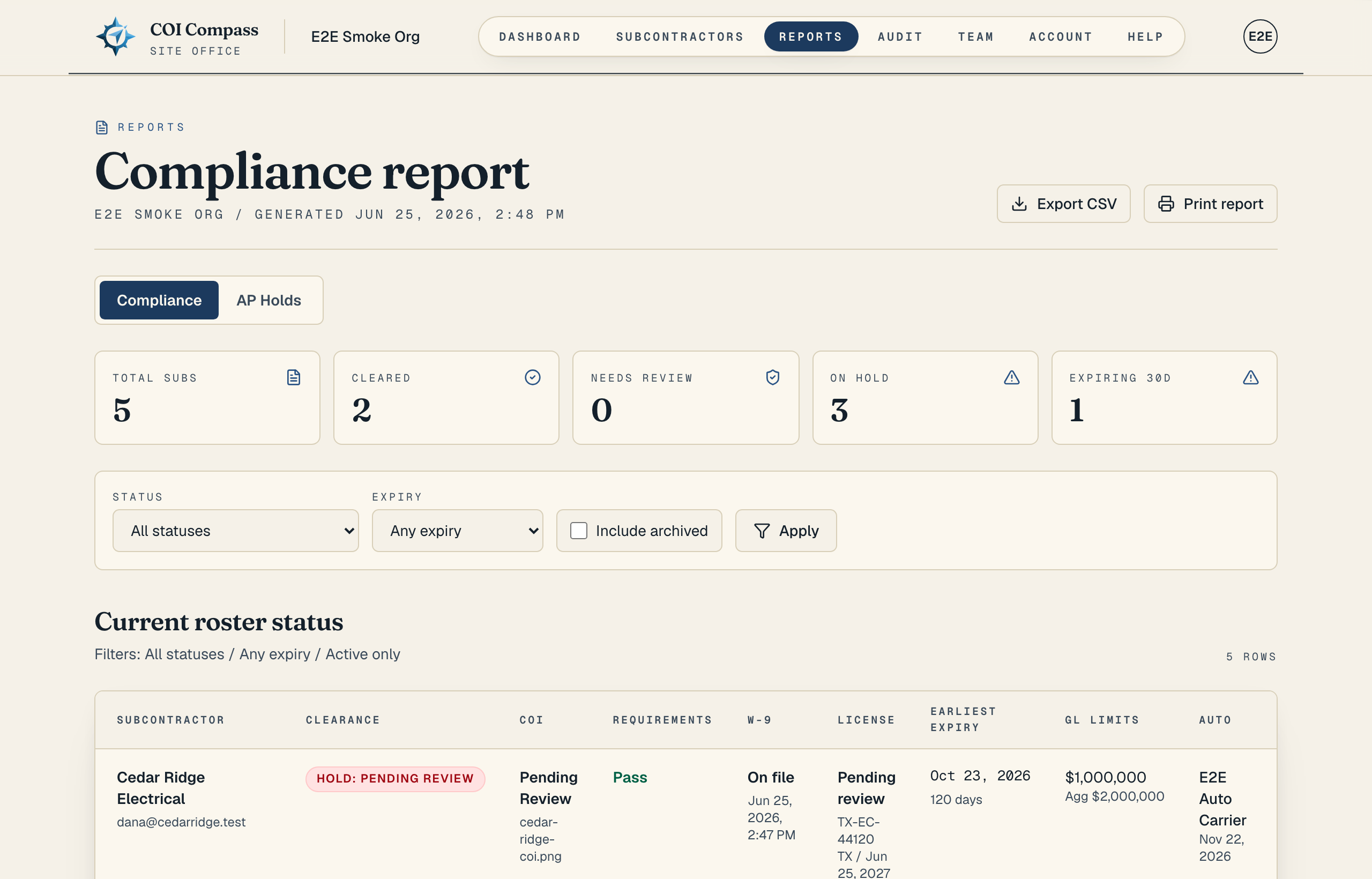
Click "Reports" in the top navigation. COI Compass opens the "Compliance" report first.
Use the report tabs to switch between "Compliance" and "AP Holds" without leaving the reporting area.
- 2
2.Read the summary cards
The cards at the top give you a quick count of the roster: "Total subs," "Cleared," "Needs review," "On hold," and "Expiring 30d."
Use these counts to decide whether you need to review documents, request renewals, or export the report for a meeting.
- 3
3.Filter the roster
Use "Status" to show "All statuses" or one clearance state, such as "Cleared," "Needs review," or "Hold: expired COI." Use "Expiry" to show "Any expiry," "Expired," "Next 30 days," "Next 60 days," or "Next 90 days."
Turn on "Include archived" when you need archived subcontractors in the report, then click "Apply." The report summary changes between "Active only" and "Includes archived" based on that checkbox.
- 4
4.Review the table columns
The roster table is labeled "Current roster status." It includes "Subcontractor," "Clearance," "COI," "Requirements," "W-9," "License," "Earliest expiry," "GL limits," "Auto," "WC," and "Last reminder."
Click a subcontractor name when you need to open that company's detail page and fix the underlying item.
- 5
5.Export or print
Click "Export CSV" to download the current filtered report. Click "Print report" to open a print-ready version with the same filters applied.
Exports and print views use the filters you already set, so apply "Status," "Expiry," and "Include archived" before sharing the report.
Common questions
Does the CSV include the same filters I see on screen?
Yes. "Export CSV" keeps the current "Status," "Expiry," and "Include archived" filters, so the download matches the report you are viewing.
What does "Earliest expiry" mean?
It is the earliest policy date COI Compass has for that subcontractor's current COI. Use it to spot the next coverage that needs renewal.